Free Menu QR Code Generator
Put your menu on every table without printing menus that go out of date. Link the code to a menu page or a PDF of your menu, download it free, and print it on table tents, stickers and takeaway packs.
A menu page on your website, or a PDF of your menu shared from Google Drive with “Anyone with the link” access.
Added under the code in the PNG and SVG, clear of the blank border phones need. Say what the scan does.
Sample code. Yours appears here as you type.
Add Link to your menu to create your code.
This code is static. Here is what that means.
Everything on this page is encoded directly into the pattern, so the code works forever and needs no account. The trade-off is that it cannot change and cannot be counted.
Static code (this tool)
- Free forever, no account needed
- Works offline, never expires
- Destination is fixed once printed
- No way to count scans
Dynamic code (Qrelux)
- Switch the table code to a new menu without reprinting, and see when diners scan
- Change the destination after printing
- See when, where and how often it is scanned
- Fix a typo without a reprint
- Compare which poster or flyer actually works
LAskill Printing saw 3× more customer engagement from the same banners and flyers.
What a dynamic code shows you
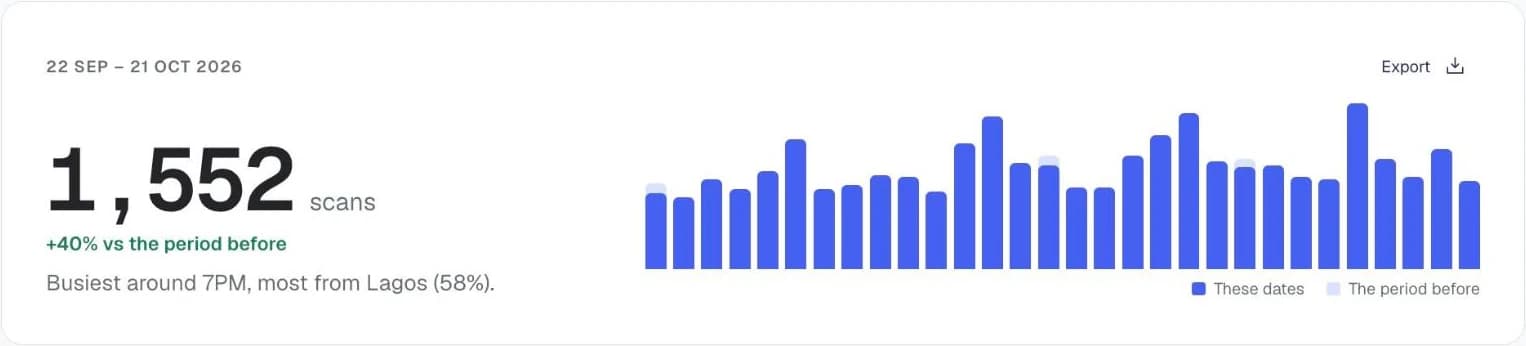
Charts from the Qrelux demo, on sample data.
How to make a menu QR code
- 1
Put your menu online
A page on your website works best on phones. A PDF in Google Drive, shared with “Anyone with the link”, works too.
- 2
Paste the link
The preview updates as you type.
- 3
Test it on mobile data
Scan it the way a guest would, off your restaurant WiFi, and check the menu loads quickly.
- 4
Print it for the tables
SVG keeps the code crisp on table tents, stickers and window decals.
Before you print your menu QR code
- Print it at least 3cm wide on table tents, so guests can scan without picking it up.
- Add a short line, “Scan for our menu”, and keep a few paper menus for guests without data.
- Avoid glossy lamination under bright lights: the glare can stop phones reading the code.
Menu QR code not working?
- The menu takes too long to load
- The PDF or the photos are too heavy. Compress the file, or use a simple menu page instead.
- Guests struggle to read the PDF
- A4 menus need pinching and zooming. A mobile menu page, or a PDF designed for phone screens, is easier to read.
- The prices changed
- If your link stays the same, update the page or replace the PDF in Google Drive with “Manage versions”. Otherwise a dynamic code lets you point the same table code at a new menu.
Where to use a menu QR code
Restaurants and bukas
Save on reprinting laminated menus every time the price of rice or tomatoes changes.
Cafés, bars and lounges
Put the menu and the WiFi code side by side on each table tent.
Takeaway and delivery packs
Print the menu code on bags and boxes so the next order starts with your full menu.
Using it for your business? See how Qrelux works for restaurants.
Menu QR code: common questions
Do I need a website for a menu QR code?
No. A PDF of your menu in Google Drive, shared with “Anyone with the link”, works fine. A menu page is nicer to read on a phone, but it isn't required.
Can I change the menu without reprinting the code?
Yes, as long as the link stays the same: edit your menu page, or replace the PDF in Google Drive using “Manage versions”. With a Qrelux code you can also switch to a completely different menu link and see how many diners scan, and when.
Should I still keep paper menus?
Keep a few. Some guests have no data or a flat battery, and a paper menu stops that from becoming a lost order.
Can I use one code for every table?
Yes, one code can go on every table. If you want to know which tables or branches scan most, give each its own Qrelux code.
Before you print: make it a code you can change and count.
Free plan, no time limit · No credit card