Free URL QR Code Generator
Paste a link to your website, Instagram page or online store and get a QR code that opens it when scanned. Download it as a PNG for slides and social, or as an SVG your printer can scale to any size without it going soft.
We add https:// if you leave it off.
Added under the code in the PNG and SVG, clear of the blank border phones need. Say what the scan does.
Sample code. Yours appears here as you type.
Add Website address to create your code.
This code is static. Here is what that means.
Everything on this page is encoded directly into the pattern, so the code works forever and needs no account. The trade-off is that it cannot change and cannot be counted.
Static code (this tool)
- Free forever, no account needed
- Works offline, never expires
- Destination is fixed once printed
- No way to count scans
Dynamic code (Qrelux)
- A/B test two pages from one printed code
- Send iPhones, Android phones, countries or languages to different pages
- Change the destination after printing
- See when, where and how often it is scanned
- Fix a typo without a reprint
- Compare which poster or flyer actually works
LAskill Printing saw 3× more customer engagement from the same banners and flyers.
What a dynamic code shows you
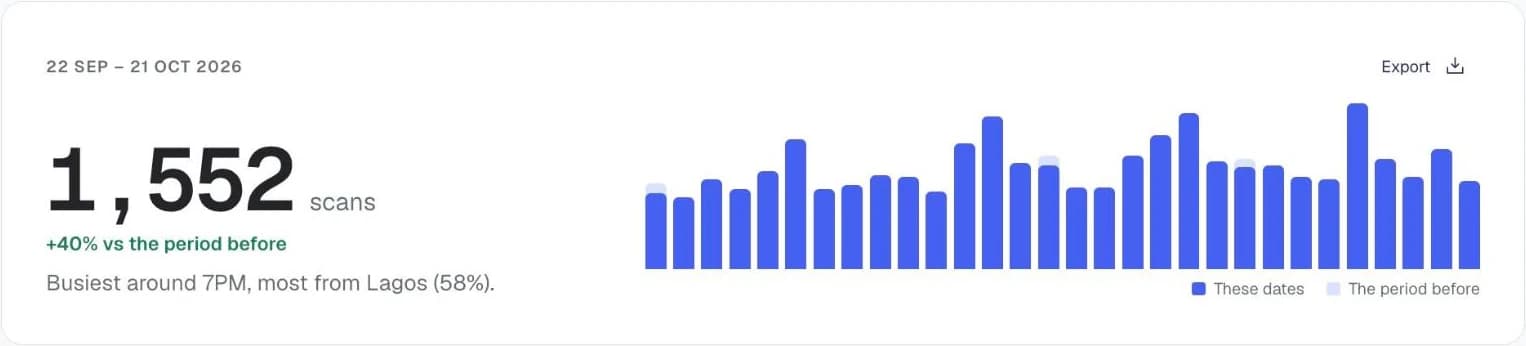
Charts from the Qrelux demo, on sample data.
How to make a URL QR code
- 1
Paste your link
Enter the full address including https://. A code built from a shortened link still works, but it will break if the shortener ever goes away.
- 2
Check the preview
The code updates as you type. Scan it with your own phone before you use it anywhere.
- 3
Download PNG or SVG
Use SVG for anything going to print, and PNG for screens. Both are free and unwatermarked.
Before you print your URL QR code
- Print it at least 2cm wide on a flyer or card someone holds. For a poster read from 2 metres away, go to about 20cm: a rough rule is a tenth of the scanning distance.
- Leave a clear white border around the code, at least as wide as four of its small squares.
- Use the shortest link you can. A shorter address makes a simpler pattern that prints smaller and scans faster.
- Check the page loads quickly on a phone, since nearly everyone who scans will open it on mobile data.
URL QR code not working?
- The phone shows the address but won't open it
- Check the spelling of the address. The generator adds https:// for you, but it can't fix a typo in the domain.
- It opens the wrong page
- A static code can't be edited once printed. Correct the link and print a new code, or use a dynamic code next time so you can fix it after printing.
- Some phones can't read it
- It is usually printed too small, too light, or on glossy paper that catches the light. Print it larger and darker, on matte paper.
Where to use a URL QR code
Packaging and labels
Send buyers to setup instructions or a registration page without printing a long URL nobody will type.
Flyers, banners and shop signs
From a market stall to a boutique window, a code gets people from your printed sign to your website or online store faster than typing a URL.
Slides and business cards
Give people a way to take the link with them instead of photographing your slide.
Using it for your business? See how Qrelux works for marketing teams and packaging.
URL QR code: common questions
Does the QR code expire?
No. A static code is just your URL encoded as a pattern, so it works for as long as the destination page exists. Nothing on our side can switch it off.
Can I change where it points later?
Not with a static code — the address is baked into the pattern, so changing it means printing a new code. A dynamic code keeps the same printed pattern and lets you repoint it whenever you like.
Why did my code get denser when I added a longer link?
Longer text needs more modules to encode. If the pattern looks too fine to print small, shorten the URL first — a shorter address makes a visibly simpler code.
Can I use it for my Instagram page or online store?
Yes, any link works: your website, an online store, a payment page or a social profile. For social profiles there is also a social media QR code type that builds the link from your username.
Is a free QR code safe to put on my business materials?
A static code from this page holds nothing but your link, so no one can redirect or switch it off, including us. The real risk with QR codes is someone sticking a fake code over yours, so check your printed codes now and then.
Before you print: make it a code you can change and count.
Free plan, no time limit · No credit card