Free WhatsApp QR Code Generator
Open a WhatsApp chat with your business, message already written. In Nigeria, WhatsApp is where a lot of buying actually happens, and this removes the step where customers have to find your number first.
Include the country code. Spaces and symbols are removed automatically.
Added under the code in the PNG and SVG, clear of the blank border phones need. Say what the scan does.
Sample code. Yours appears here as you type.
Add WhatsApp number to create your code.
This code is static. Here is what that means.
Everything on this page is encoded directly into the pattern, so the code works forever and needs no account. The trade-off is that it cannot change and cannot be counted.
Static code (this tool)
- Free forever, no account needed
- Works offline, never expires
- Destination is fixed once printed
- No way to count scans
Dynamic code (Qrelux)
- Move the chat to a new number, or change the message, without reprinting
- Change the destination after printing
- See when, where and how often it is scanned
- Fix a typo without a reprint
- Compare which poster or flyer actually works
LAskill Printing saw 3× more customer engagement from the same banners and flyers.
What a dynamic code shows you
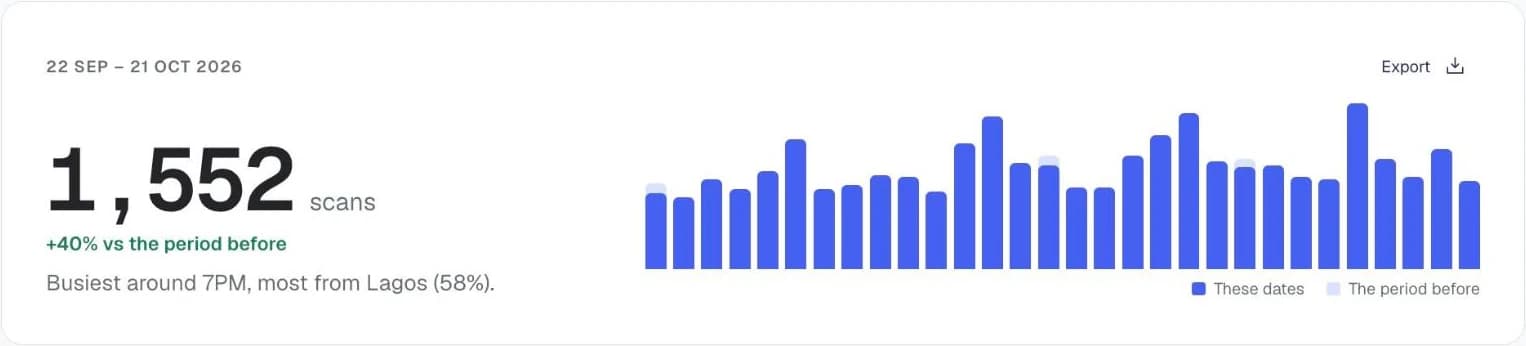
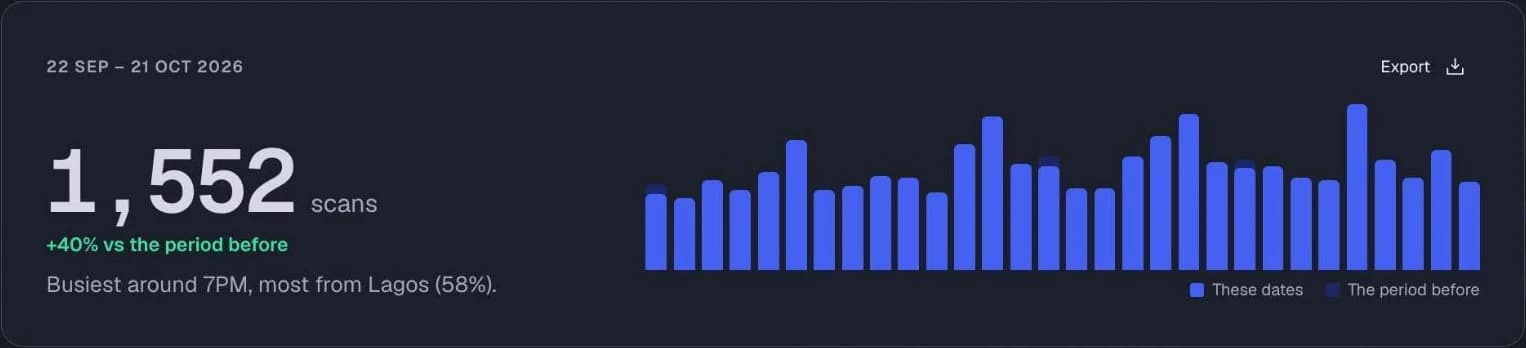
Charts from the Qrelux demo, on sample data.
How to make a WhatsApp QR code
- 1
Enter your WhatsApp number
Include the country code. Spaces, brackets and dashes are stripped automatically, because wa.me only accepts digits.
- 2
Write the opening message
Something like 'Hi, I'd like to order' means the customer only has to press send.
- 3
Scan to check the chat opens
Confirm it lands on the right account and the message is filled in.
- 4
Download and display
SVG for print, PNG for social and screens.
Before you print your WhatsApp QR code
- Print it at least 2.5cm wide on packaging and receipts, and 15cm or more on a shop window or banner.
- Tell people what happens when they scan: “Scan to order on WhatsApp”.
- Use a number someone actually watches, ideally on WhatsApp Business so you can set an away message.
WhatsApp QR code not working?
- It opens a browser page first
- wa.me links can show a short WhatsApp page with a “Continue to chat” button, especially if the app isn't installed. That step is WhatsApp's, not a fault in the code.
- The chat opens but the message is empty
- Some older versions of WhatsApp ignore pre-filled text. The chat still opens and the customer types their own message.
- Customers are messaging an old number
- The number is fixed in a static code. Print new codes, or use a dynamic code so you can switch numbers without reprinting.
Where to use a WhatsApp QR code
Takeaway and delivery
Put a code on the packaging so reorders start in a chat rather than a phone call.
Market stalls and shopfronts
From a market stall to a boutique, let customers ask about stock and prices without queueing.
Catalogues and price lists
Turn a printed sheet into an enquiry with the item already named in the message.
Using it for your business? See how Qrelux works for restaurants and packaging.
WhatsApp QR code: common questions
Do I need WhatsApp Business?
No, it works with a personal account too. WhatsApp Business adds catalogues, away messages and quick replies, which help once the volume picks up.
Why does my WhatsApp code not open a chat?
Usually the number is wrong. It needs the country code and digits only — 0704... will not work where +234704... does. The generator strips punctuation for you, but it cannot guess a missing country code.
Can I change the pre-filled message later?
Not on a static code, since the message is part of the encoded link. A dynamic code lets you change the wording — or switch the number entirely — after the code is printed.
Can I use it for a WhatsApp group or channel?
This generator opens a chat with a number. For a group or channel, copy its invite link in WhatsApp and use the URL QR code type instead.
How do I add a WhatsApp QR code to my flyer?
Download the SVG and send it to your designer, or drop the PNG into Canva or Word. Leave white space around it and print it at least 2.5cm wide.
Before you print: make it a code you can change and count.
Free plan, no time limit · No credit card